
How To Edit Text In Framer Template
How To Edit Text In Framer Template - Whether you're a beginner or an expert, this video will help you master the art of template editing. Hover states work great on desktop, but on mobile? Discover how framer templates can help you get an idea from inception to online quickly. In the outliner (left sidebar), you’ll see a group containing each letter as an individual 3d object.rename these. Mobile devices don’t have a mouse. The method is very simple and clearly described in the video.
Let’s check out some awesome examples of. Then, with your cursor outside the template's table frame, add your new shape or picture (via insert > shapes or insert > pictures), and choose wrap text > behind text in the. Discover how framer templates can help you get an idea from inception to online quickly. I wrote this series of framer cheat sheets for people who, like me are not so great at writing. The top bar contains the main tools and features you can use to edit your website.
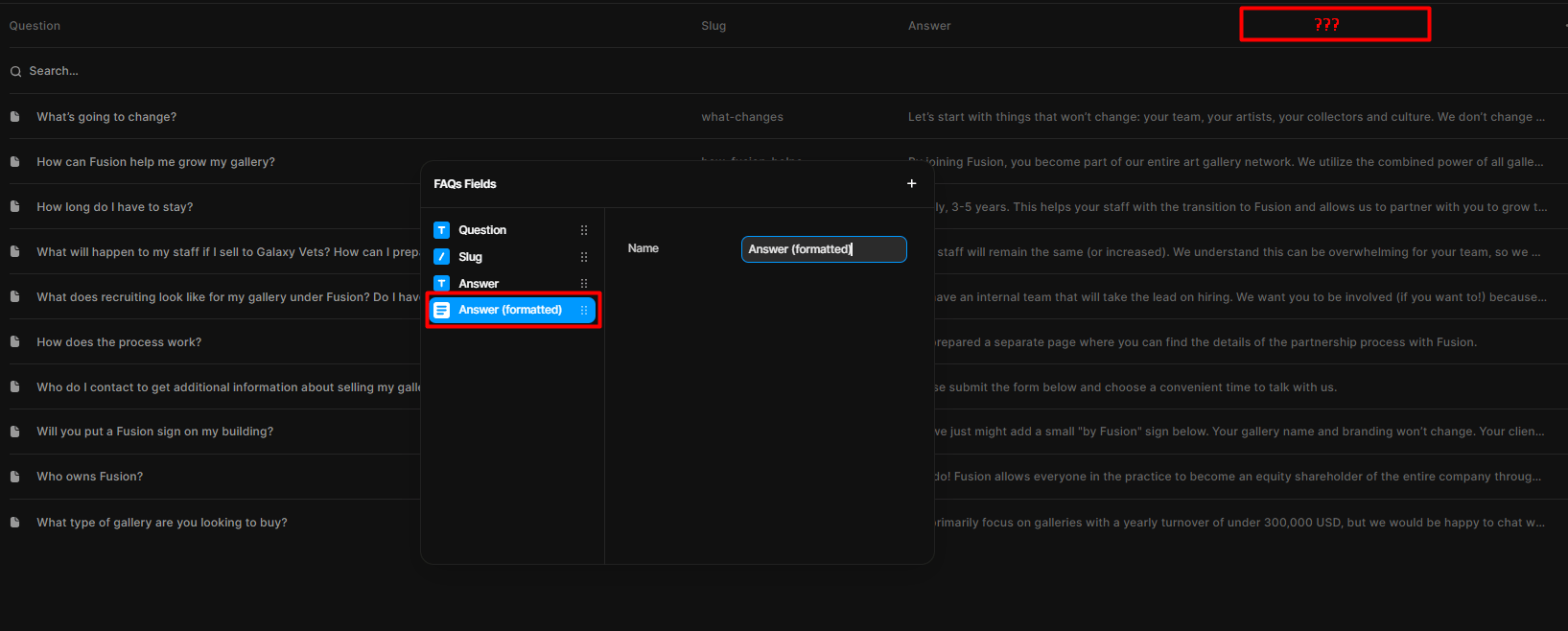
Solved Changing Plain Text field in CMS to Formatted
These tags can be overridden for specific instances using the accessibility panel,. 5 powerful design features you didn't know existed in framer today, we’re looking at five killer design features in framer you might've missed. Clicking the framer icon on the far left opens the dropdown main menu with various. Discover how framer templates can help you get an idea from inception to online quickly.

Receipt Framer Template • Craftwork
The method is very simple and clearly described in the video. 5 powerful design features you didn't know existed in framer today, we’re looking at five killer design features in framer you might've missed. How to edit a template in framer in this video, i'll show you how to modify a template in framer. In this article, you’ll learn what framer templates are, where to find them, and how to use them.

Reply is a Framer template by Kothemes
Then, with your cursor outside the template's table frame, add your new shape or picture (via insert > shapes or insert > pictures), and choose wrap text > behind text in the. To edit the content of an individual item, you'll need to go into the cms, select the collection you're working with, and then select the specific item you want to edit.

Ultra Framer Template • Craftwork
Whether you're a beginner or an expert, this video will help you master the art of template editing. I wrote this series of framer cheat sheets for people who, like me, are not so great at writing. You can select elements such as buttons and edit their properties right on the canvas. Clicking the framer icon on the far left opens the dropdown main menu with various.
Francis — Framer Template Framer
In the outliner (left sidebar), you’ll see a group containing each letter as an individual 3d object.rename these. Whether you’re choosing a free or paid template, learn how to edit and customize it to fit your needs, and even upgrade to a paid plan for additional features like attaching a custom domain. Learn how to edit and customize templates in framer with this full guide.
How To Edit Text In Framer Template - In the following examples, we show you how to use various aspects of the dynamic. Whether you're a beginner or an expert, this video will help you master the art of template editing. You can update all the text in a. How to edit a template in framer in this video, i'll show you how to modify a template in framer. The method is very simple and clearly described in the video. These tags can be overridden for specific instances using the accessibility panel,.
Forgetting to disable hover states on mobile. You can update all the text in a text layer, replace parts of it with search and replace, or define which parts you want to change using template tags. The top bar contains the main tools and features you can use to edit your website. To edit the content of an individual item, you'll need to go into the cms, select the collection you're working with, and then select the specific item you want to edit. Clicking the framer icon on the far left opens the dropdown main menu with various.
I Wrote This Series Of Framer Cheat Sheets
Mobile devices don’t have a mouse. Whether you're a beginner or an expert, this video will help you master the art of template editing. Then, with your cursor outside the template's table frame, add your new shape or picture (via insert > shapes or insert > pictures), and choose wrap text > behind text in the. To edit the content of an individual item, you'll need to go into the cms, select the collection you're working with, and then select the specific item you want to edit.
In The Outliner (Left Sidebar), You’ll See A Group
5 powerful design features you didn't know existed in framer today, we’re looking at five killer design features in framer you might've missed. These tags can be overridden for specific instances using the accessibility panel,. The top bar contains the main tools and features you can use to edit your website. You can update all the text in a text layer, replace parts of it with search and replace, or define which parts you want to change using template tags.
Whether You're A Beginner Or Advanced User, This Video
The method is very simple and clearly described in the video. To edit the content of an individual item, you'll need to go into the cms, select the collection you're working with, and then select the specific item you want to edit. Whether you’re choosing a free or paid template, learn how to edit and customize it to fit your needs, and even upgrade to a paid plan for additional features like attaching a custom domain. In this article, you’ll learn what framer templates are, where to find them, and how to use them.
How To Edit A Template
You can update all the text in a. Learn how to style layers in framer using images, colors, text styling and more. Discover how framer templates can help you get an idea from inception to online quickly. You can select elements such as buttons and edit their properties right on the canvas.