
Wordpress Edit Template
Wordpress Edit Template - Wordpress template editing mode is pretty much what the name implies. The template editor is only available if your site is using a block theme or a classic theme that has enabled the template editor on the backend. They are files that you put together to represent the document structure that appears on the front end of a website. For example, you can control where to. This will take you to your site editor. A template controls the layout in which the content of pages and posts is presented.
This will take you to your site editor. Under the “template” section, select the ‘edit’ option. This guide will show you how to edit the page template. The template editor allows you to edit and create templates, using blocks. In this tutorial, we will see how to create a custom template, which lets you use a different design or layout from the rest of your website.
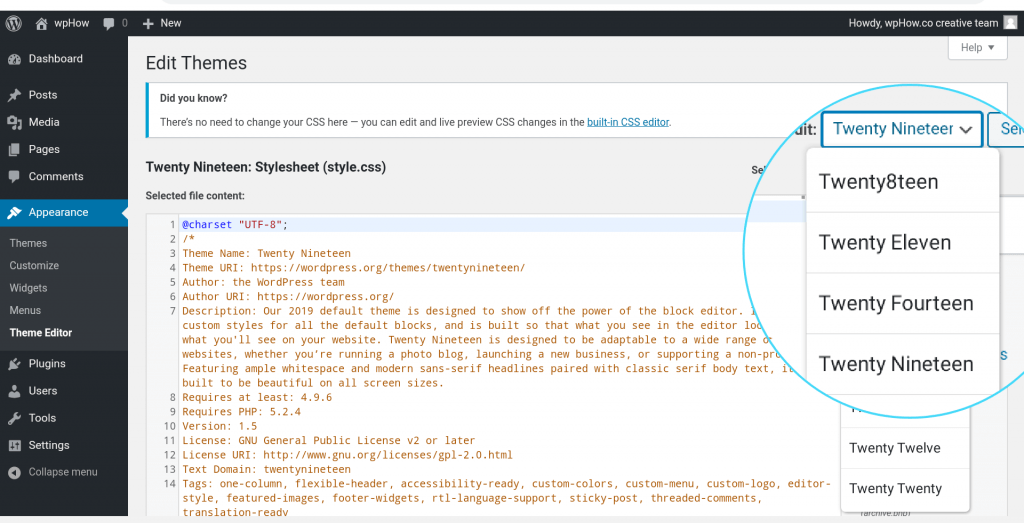
How To Edit WordPress Template Files? 3 Easy Methods
Instead, go to posts in your site’s dashboard. Under the “template” section, select the ‘edit’ option. This will take you to your site editor. A template controls the layout in which the content of pages and posts is presented. The editor can be used to customize the styles of your entire site, edit pages, modify templates, as well as manage all the different patterns on your site.

WhatsApp Message Template
For example, you can control where to. Templates are one of the most important aspects of theme development. If you don’t see the option to edit at first, it’s likely because you’re not using a block theme that allows you to. Instead of letting you edit the content of a post, it lets you edit the template that controls how that content is displayed.

Inspirational quote poster template, editable Premium Editable
The editor can be used to customize the styles of your entire site, edit pages, modify templates, as well as manage all the different patterns on your site. For example, you can control where to. Instead of letting you edit the content of a post, it lets you edit the template that controls how that content is displayed. These templates control the layout of the posts, pages, or page types on your site.

Wordpress Edit Post Template
A template controls the layout in which the content of pages and posts is presented. If your site uses a theme that supports the site editor, you can access and edit templates. We’re here to show you how to make your wordpress site uniquely yours, whether you’re a tech whiz or just starting. Under the “template” section, select the ‘edit’ option.

Wordpress New Page Template Card Template
This means you can create a page or post template with a unique header, footer, or other page elements. Wordpress template editing mode is pretty much what the name implies. To access templates, make your way to appearance and click on editor. Add a new post or page. Instead of letting you edit the content of a post, it lets you edit the template that controls how that content is displayed.
Wordpress Edit Template - Under the “template” section, select the ‘edit’ option. If your site uses a theme that supports the site editor, you can access and edit templates. The template editor allows you to edit and create templates, using blocks. In this tutorial, we will see how to create a custom template, which lets you use a different design or layout from the rest of your website. Add a new post or page. This guide will show you how to edit templates to customize page and post layouts, including header and footer elements.
A template controls the layout in which the content of pages and posts is presented. A quick way to determine if your site uses the site editor is to check for appearance → editor in your site’s dashboard. In this tutorial, we will see how to create a custom template, which lets you use a different design or layout from the rest of your website. When combined with global settings and styles (theme.json), you can ultimately create a unique design to use for yourself, clients, or just share with the world. Templates are one of the most important aspects of theme development.
You Can Control Where To
The template editor is only available if your site is using a block theme or a classic theme that has enabled the template editor on the backend. This will take you to your site editor. Templates are one of the most important aspects of theme development. This guide will show you how to edit the page template.
Post Template
If your site uses a theme that supports the site editor, you can access and edit templates. To access templates, make your way to appearance and click on editor. We’re here to show you how to make your wordpress site uniquely yours, whether you’re a tech whiz or just starting. This guide will show you how to edit templates to customize page and post layouts, including header and footer elements.
Edit The Single Posts Template If You Want
Wordpress template editing mode is pretty much what the name implies. These templates control the layout of the posts, pages, or page types on your site. In this tutorial, we will see how to create a custom template, which lets you use a different design or layout from the rest of your website. The editor can be used to customize the styles of your entire site, edit pages, modify templates, as well as manage all the different patterns on your site.
The Template
The template editor allows you to edit and create templates, using blocks. When combined with global settings and styles (theme.json), you can ultimately create a unique design to use for yourself, clients, or just share with the world. If you want to change the content of one post only, do not edit the single posts template. If you don’t see the option to edit at first, it’s likely because you’re not using a block theme that allows you to.