
Where To Find Your Templates Folder Fl Studio
Where To Find Your Templates Folder Fl Studio - Once it's saved there, it'll show up. Same for your 'backups' folder. Fl studio will show templates from both folders. Once you know the location, go to. You have the category folder that houses the template folder, and the template folder houses the.flp and an.nfo file containing a description for the template. Sorry if this is obvious but i’ve tried to.
Also store a.nfo file with the same name as the folder/flp containing a line icon=icon.png to tell fl where to find the icon. Pin these important fl folder paths to your quick. This short video will show you how to save your own personal starting template in fl studio, and how to change the default template. The first one has the templates that were installed with fl studio. You can make a project template by placing an flp in the fl studio templates folder.

72 Free Presentation Folder Design Templates Company Folders, Inc
Navigate to this exact folder: My recommendation is to pin your templates folder to your 'quick access' tab in your windows file. In fl studio, the template folder is located in the user data folder under the path: The icon should be a icon.png file saved with the flp. Once it's saved there, it'll show up.

Adding New Themes to FL Studio Explained OddPlug
The best way to correct this would be to simply reinstall fl studio 11.1.1 over your current installation. Why should you do this? This is the same location on both windows and mac. Also store a.nfo file with the same name as the folder/flp containing a line icon=icon.png to tell fl where to find the icon. Then, make a folder with your.flp file inside it, with both the file and folder named exactly the same.

Adding New Themes to FL Studio Explained OddPlug
This is the same location on both windows and mac. Just create a new project, set it up how you want, and save it in the template folder. Once it's saved there, it'll show up. Pin these important fl folder paths to your quick. Stock and custom templates are saved in my documents, save your custom temps in the others folder, i'll check exactly where later when i get home.
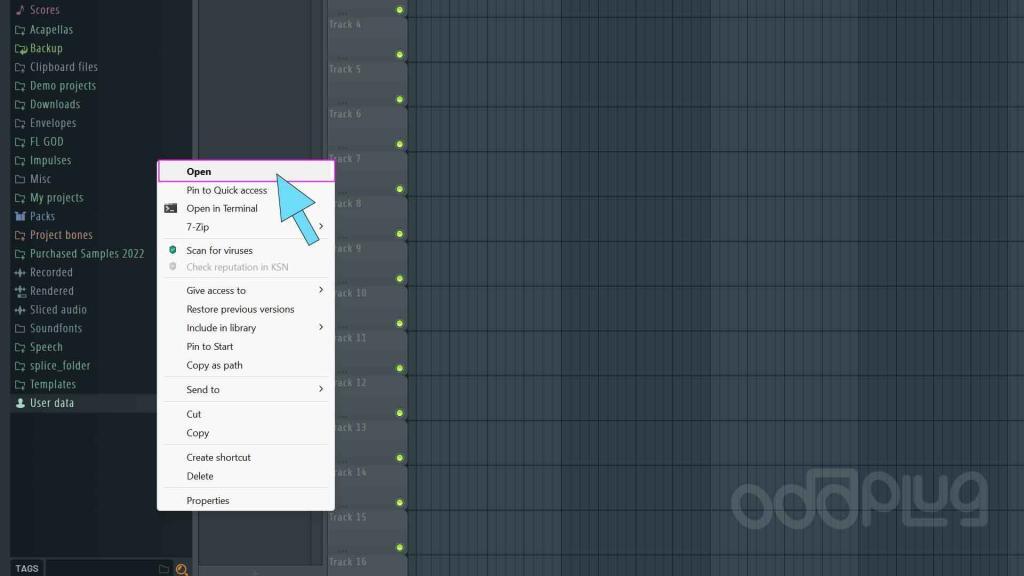
Adding New Themes to FL Studio Explained OddPlug
Same for your 'backups' folder. This short video will show you how to save your own personal starting template in fl studio, and how to change the default template. The fl studio plugin database is stored within your documents, which is known as your user data folder. In fl studio, the template folder is located in the user data folder under the path: After the installation it should restore any missing or deleted files as well as.

Finding the user data folder in FL Studio OddPlug
The fl studio plugin database is stored within your documents, which is known as your user data folder. Pin these important fl folder paths to your quick. Fl studio will show templates from both folders. Navigate to this exact folder: The best way to correct this would be to simply reinstall fl studio 11.1.1 over your current installation.
Where To Find Your Templates Folder Fl Studio - Stock and custom templates are saved in my documents, save your custom temps in the others folder, i'll check exactly where later when i get home. Pin these important fl folder paths to your quick. This short video will show you how to save your own personal starting template in fl studio, and how to change the default template. Then, make a folder with your.flp file inside it, with both the file and folder named exactly the same. Also store a.nfo file with the same name as the folder/flp containing a line icon=icon.png to tell fl where to find the icon. The place i put the folder containing the.flp(both being named mixer config) was in:.
Why should you do this? Same for your 'backups' folder. This is the same location on both windows and mac. My recommendation is to pin your templates folder to your 'quick access' tab in your windows file. The fl studio plugin database is stored within your documents, which is known as your user data folder.
This Is The Same Location On Both Windows
Same for your 'backups' folder. Pin these important fl folder paths to your quick. Why should you do this? You have the category folder that houses the template folder, and the template folder houses the.flp and an.nfo file containing a description for the template.
Fl Studio Will Show Templates From Both Folders
The best way to correct this would be to simply reinstall fl studio 11.1.1 over your current installation. Sorry if this is obvious but i’ve tried to. After the installation it should restore any missing or deleted files as well as. Also store a.nfo file with the same name as the folder/flp containing a line icon=icon.png to tell fl where to find the icon.
Stock And Custom Templates Are Saved In My Documents,
The fl studio plugin database is stored within your documents, which is known as your user data folder. Then, make a folder with your.flp file inside it, with both the file and folder named exactly the same. You can make a project template by placing an flp in the fl studio templates folder. The place i put the folder containing the.flp(both being named mixer config) was in:.
My Recommendation Is To Pin Your Templates Folder
Just create a new project, set it up how you want, and save it in the template folder. Return back to the folder where you extracted templates. The icon should be a icon.png file saved with the flp. Once it's saved there, it'll show up.