
Import Admx Templates
Import Admx Templates - Thankfully, if you still have your administrative. In windows server 2008 and 2008 r2, the administrative template files are xml files with an admx or an adml extension. If you are looking to expand your group policy’s editor settings, you should install admx templates for your pc. Easily manage windows device settings by importing admx files to group policy. Import microsoft edge admx templates. Now that we’ve downloaded and extracted the edge admx template files, we must import them onto the domain controller.
Now that we’ve downloaded and extracted the edge admx template files, we must import them onto the domain controller. Naturally i wanted to play around with. Import microsoft edge admx templates. For chrome or office), and then. Customize policies for your organization.

Import ADMX templates
The changes that are implemented in these. Administrators can use these files to specify and manage. For chrome or office), and then. If you are looking to expand your group policy’s editor settings, you should install admx templates for your pc. Once imported, you can create a device.

Import Admx Templates
We now have the possibility to import administrative templates files admx and adml files of third party parties into endpoint manager. For more information on this change, see windows device configuration policies migrating to unified settings. Import microsoft edge admx templates. The changes that are implemented in these. By default, conf.adm, inetres.adm, and system.adm are selected for use in the group policy element.to add a new adm template to the list, click import template files.

Import ADMX templates
We now have the possibility to import administrative templates files admx and adml files of third party parties into endpoint manager. For more information on this change, see windows device configuration policies migrating to unified settings. If you are looking to expand your group policy’s editor settings, you should install admx templates for your pc. Easily manage windows device settings by importing admx files to group policy.
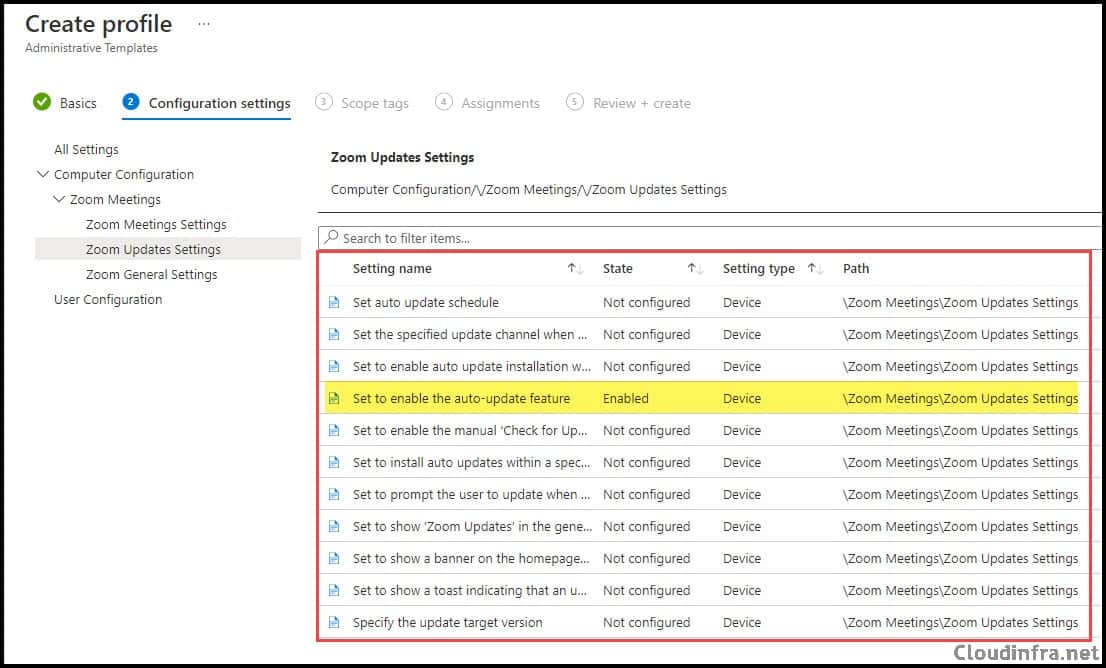
Import ADMX Templates Into Intune
By default, conf.adm, inetres.adm, and system.adm are selected for use in the group policy element.to add a new adm template to the list, click import template files. The changes that are implemented in these. If you are looking to expand your group policy’s editor settings, you should install admx templates for your pc. Thankfully, if you still have your administrative.

Import Admx Templates
If you are looking to expand your group policy’s editor settings, you should install admx templates for your pc. Naturally i wanted to play around with. For chrome or office), and then. For more information on this change, see windows device configuration policies migrating to unified settings. Once imported, you can create a device.
Import Admx Templates - We now have the possibility to import administrative templates files admx and adml files of third party parties into endpoint manager. For more information on this change, see windows device configuration policies migrating to unified settings. You can import custom and third party/partner admx and adml templates into the endpoint manager admin center (microsoft intune). All you need to do is download them from the official microsoft. If you are looking to expand your group policy’s editor settings, you should install admx templates for your pc. By default, conf.adm, inetres.adm, and system.adm are selected for use in the group policy element.to add a new adm template to the list, click import template files.
Easily manage windows device settings by importing admx files to group policy. In windows server 2008 and 2008 r2, the administrative template files are xml files with an admx or an adml extension. After the matching admx and adml templates are downloaded, go to devices > configuration profiles and select “import admx.” click the import link and navigate to the matching admx. For more information on this change, see windows device configuration policies migrating to unified settings. Administrators can use these files to specify and manage.
Administrative Templates
By default, conf.adm, inetres.adm, and system.adm are selected for use in the group policy element.to add a new adm template to the list, click import template files. In windows server 2008 and 2008 r2, the administrative template files are xml files with an admx or an adml extension. Naturally i wanted to play around with. You can import custom and third party/partner admx and adml templates into the endpoint manager admin center (microsoft intune).
Thankfully, If You Still Have Your Administrative
The changes that are implemented in these. For more information on this change, see windows device configuration policies migrating to unified settings. After the matching admx and adml templates are downloaded, go to devices > configuration profiles and select “import admx.” click the import link and navigate to the matching admx. Customize policies for your organization.
Once Imported, You Can Create A Device
Now that we’ve downloaded and extracted the edge admx template files, we must import them onto the domain controller. Import microsoft edge admx templates. All you need to do is download them from the official microsoft. To create admx template profiles, use the settings catalog.
Easily Manage Windows Device Settings By Importing Admx Files
We now have the possibility to import administrative templates files admx and adml files of third party parties into endpoint manager. For chrome or office), and then. Administrators can use these files to specify and manage. If you are looking to expand your group policy’s editor settings, you should install admx templates for your pc.