
How To Duplicate Templates
How To Duplicate Templates - I'm immediately shown the error the certificate template could not be duplicated. You can do this by selecting all text (ctrl + a) and then clicking on the clear all formatting button in the home tab. Copying a template in word is a quick and easy process that can save you time and help maintain consistency in your documents. In just a few clicks, you’ll have a new document that’s ready to go! In this article, we’ll walk through the process of copying an excel template to a new sheet, step by step. You'll use this as a template/inspiration.
Duplicating objects in template editoryou can make identical duplicates of template objects without having to create a new object from scratch.to make a duplicate of an existing object: Simply open the template you want to copy, save it as a new document, and then edit it as needed. We’ll cover different methods you can use, depending on your preferences and the version of excel you have. Bolt armor trim is a smithing template that is used to visually customize your armor using a smithing table. Copy a team member’s workflow.

SaaS Insights details of Duplicato ‑ Duplicate Template
Since many retailers use the same copy, duplicate content lowers your chances of ranking well on search engines. Instead, craft unique, engaging descriptions that naturally incorporate keywords based on. Choose a name for your duplicated template and select the folder where you want to save it. Copy a team member’s workflow. This can be achieved by switching from the visual editor to the code editor.
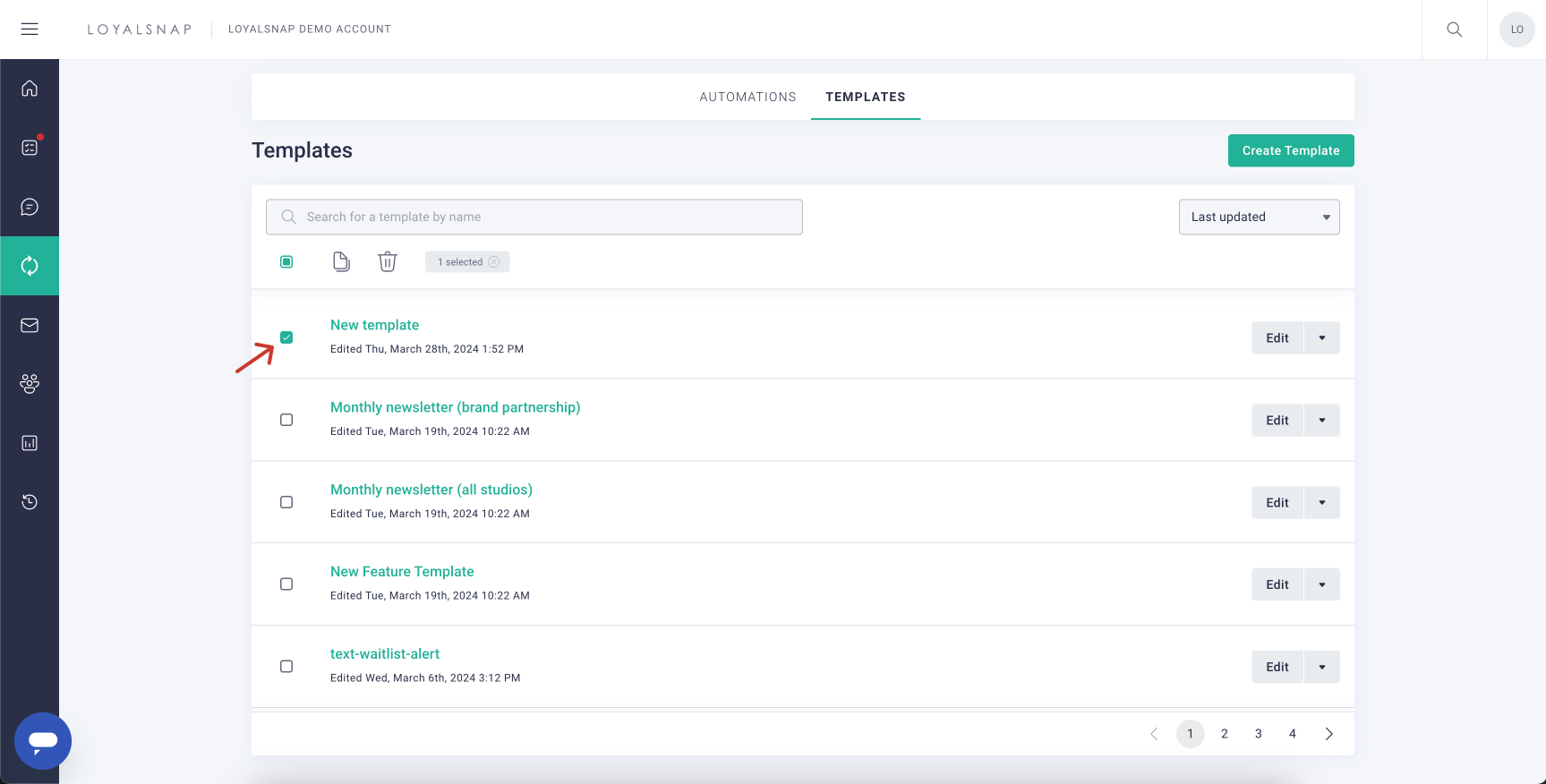
Duplicate Templates to Other Studios Help Center
How do i duplicate smithing templates? To duplicate a smithing template, you'll need the following materials: Bolt armor trim is a smithing template that is used to visually customize your armor using a smithing table. Once you’ve secured a smithing template, it can be duplicated using the crafting table. Duplicating objects in template editoryou can make identical duplicates of template objects without having to create a new object from scratch.to make a duplicate of an existing object:.

FREE 6+ Sample Duplicate Order Forms in MS Word
Let's explore how to duplicate bolt armor trim in minecraft. Here is a list of all the needed materials for each smithing template: You need to have the following items before crafting another one: You'll use this as a template/inspiration. Press ctrl+a to select the entire document, and press ctrl+c to copy it.

How to duplicate Templates? — Betheme Support Forum
Press ctrl+a to select the entire document, and press ctrl+c to copy it. (with buttons, home > select > select all, and then home > copy.) Let's explore how to duplicate bolt armor trim in minecraft. Along the way, we’ll cover how templates can save you loads of effort and the caveats of sharing forms. The duplication process involves the following:.

Duplicate Templates Cisco IoT Operations Dashboard Cisco
When duplicating eye armor trim, it is important that the diamonds, end stone, and eye armor trim are placed in the exact pattern as the image below. Press ctrl+a to select the entire document, and press ctrl+c to copy it. Whether you’re a newbie or a seasoned pro, you’re bound to. Simply open the template you want to copy, save it as a new document, and then edit it as needed.
How To Duplicate Templates - The last part changes depending on the smithing template. When someone runs a workflow in a chat or channel where you’re a member, check the notification card to confirm who created the workflow and that it’s the workflow you want. X7 diamond, x1 smithing template, and x1 required material. Select the collaborate or duplicate button. So, pull up a chair and let’s walk you through how to duplicate a microsoft form with ease. The blocks needed for each recipe change depending on the smithing template you want to duplicate.
In minecraft, these are the materials you can use to duplicate bolt armor trim: To make a duplicate of an existing object: Select get template to copy the workflow. You'll need 4 iron nuggets for each duplication attempt. You'll use this as a template/inspiration.
In Microsoft Forms, Open The Quiz Or Form
Click on the three dots (…) next to the template name and select “make a copy” from the dropdown menu. When someone runs a workflow in a chat or channel where you’re a member, check the notification card to confirm who created the workflow and that it’s the workflow you want. Once you’ve secured a smithing template, it can be duplicated using the crafting table. Select the collaborate or duplicate button.
Press Ctrl+A To Select The Entire Document, And Press
Tutorial explaining how to duplicate the smithing templates in minecraft. You'll use this as a template/inspiration. Whether you’re a newbie or a seasoned pro, you’re bound to. Once you have found bolt armor trim in the game, you can duplicate it to create more.
You Can Do This By Selecting All Text (Ctrl
No existing response data is carried over to the new quiz or form when someone else duplicates it. To duplicate a smithing template, you need to use the crafting stone and follow the right recipe: When you share a quiz or form as a template, only the content of it is duplicated. The blocks needed for each recipe change depending on the smithing template you want to duplicate.
In Bedrock Edition, Spire, Tide, And Dune Armor Trims
In just a few clicks, you’ll have a new document that’s ready to go! Select get template to copy the workflow. Try clearing the formatting of the destination document. 7 diamonds, 1 smithing template, and 1 building block.