
How To Create Docusign Template
How To Create Docusign Template - Enter a name and description for your template. You can find detailed steps on how to create a template, here: You can create a template from scratch. How to create a template. Templates are perfect for almost any docusign workflow that you do over and over again. From the my forms page in jotform, click the create form button.
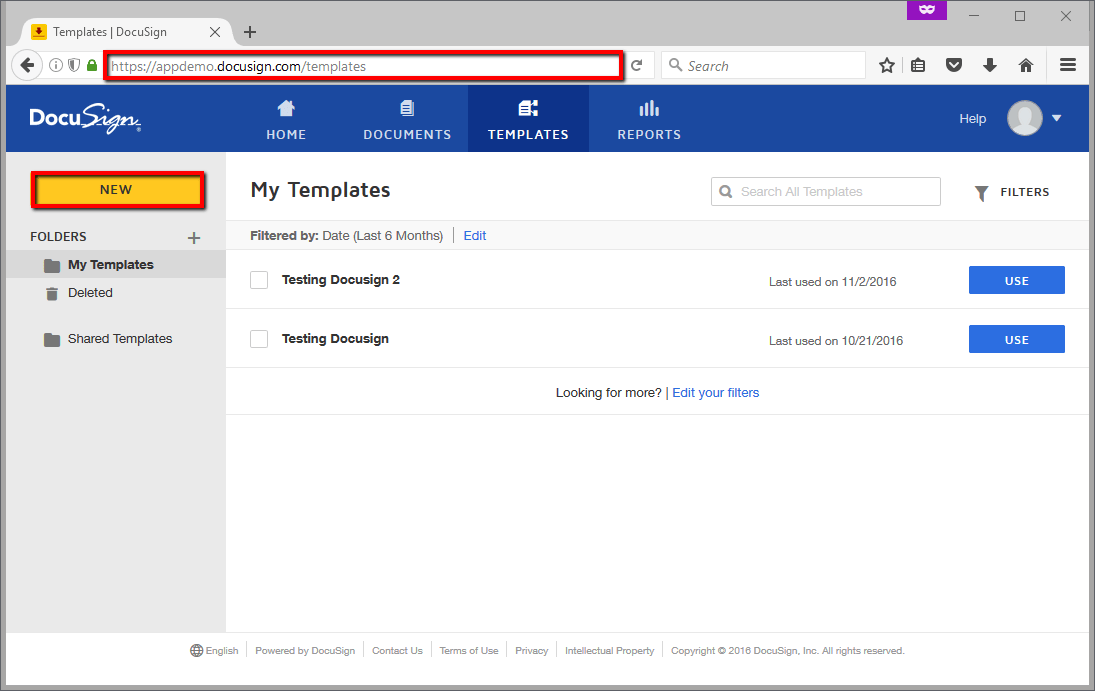
In this video series, you learn how to create, edit, share, and protect esignature templates. Creating a template in docusign involves a series of steps to design and configure the document layout, customize signature fields, specify recipients, and upload necessary files for the. From the templates page, click new and select create template. In this guide, we will cover everything you need to know about drafting contracts and forms in docusign esignature, from using templates to sending it for electronic signature. In this article, we will guide you through the steps of creating a docusign template, including accessing the template editor, designing your template, adding recipients and fields, and.

How to create a new template in DocuSign
Other varieties of templates, such as powerforms, elastic templates, web forms, and the. Streamline your workflow by creating a template. From the templates page, click new and select create template. Templates can range from simple to very complex, but they allow you to create the document once and reuse it as many times as you like. In this guide, we will cover everything you need to know about drafting contracts and forms in docusign esignature, from using templates to sending it for electronic signature.

Create A Template In Docusign
Templates are perfect for almost any docusign workflow that you do over and over again. From the templates page, select start > envelope templates > create a template. You can find detailed steps on how to create a template, here: Click on upload to upload one or more files to the template. Choose upload document, then drag and drop your pdf file into the blue.
Docusign template Laserfiche Answers
From the templates page, click new and select create template. From the my forms page in jotform, click the create form button. Docusign has a waste template library for different industries like finance, healthcare and hr. From the templates page, select start > envelope templates > create a template. From logging into your account to saving the template, we will guide you.

Create Docusign Template Printable Word Searches
From the templates page, select start > envelope templates > create a template. Document templates provide a centralized repository to create and manage documents used within docusign and iam, saving time and ensuring compliance. You can find detailed steps on how to create a template, here: The prepare view displays, where you can add documents, recipient roles, and. How to create a web form 3 min.

Create Docusign Template
Choose upload document, then drag and drop your pdf file into the blue. Creating a template in docusign involves a series of steps to design and configure the document layout, customize signature fields, specify recipients, and upload necessary files for the. From the templates page, click new and select create template. How to create a web form 3 min. Other varieties of templates, such as powerforms, elastic templates, web forms, and the.
How To Create Docusign Template - Other varieties of templates, such as powerforms, elastic templates, web forms, and the. Or copy an existing template and make changes to it. In this article, we will show you how to create and use templates in docusign to streamline your document workflow. Creating a template in docusign involves a series of steps to design and configure the document layout, customize signature fields, specify recipients, and upload necessary files for the. Templates can range from simple to very complex, but they allow you to create the document once and reuse it as many times as you like. From the templates page, select start > envelope templates > create a template.
Enter a name and description for your template. In this article, we will guide you through the steps of creating a docusign template, including accessing the template editor, designing your template, adding recipients and fields, and. How do i create a template? Docusign templates are a convenient tool that can save you time and effort when it comes to creating and sending standardized documents. In this video series, you learn how to create, edit, share, and protect esignature templates.
Or Copy An Existing Template And Make Changes
From the templates page, click new and select create template. How to create an elastic template 4 min. You can find detailed steps on how to create a template, here: Enter a name and description for your template.
From The My Forms Page In Jotform, Click
How do i create a template? Streamline your workflow by creating a template. Templates can range from simple to very complex, but they allow you to create the document once and reuse it as many times as you like. You can also use the save as template feature to make a template out of any of.
Docusign Templates
Other varieties of templates, such as powerforms, elastic templates, web forms, and the. Click on upload to upload one or more files to the template. Docusign has a waste template library for different industries like finance, healthcare and hr. Learn how to create a docusign template for esignature.
Looking For A Way To Save Even More Time
In this article, we will show you how to create and use templates in docusign to streamline your document workflow. How to create a template. Do you find yourself sending the same document over and over? Choose upload document, then drag and drop your pdf file into the blue.