
Trackpad Drawing Mac
Trackpad Drawing Mac - Sensors underneath the trackpad surface detect subtle differences in the amount of pressure you apply, bringing more functionality to your fingertips and enabling a deeper connection to your content. It enables full trackpad functionality on macbooks running windows, enhancing the user experience. If you're a basic user and only need a trackpad to move your cursor and click on things, a basic trackpad will likely suffice. However, if you're a power user who needs a trackpad that can keep. Windows has a similar setting to disable the laptop touchpad when. A touchpad or trackpad is a type of pointing device.
The device features a compact keyboard with a row of slim media keys. Rather than purchase a keyboard, trackpad, or mouse separately, the arteck combines all three into a single device. If you're a basic user and only need a trackpad to move your cursor and click on things, a basic trackpad will likely suffice. Upon installing the trackpad++ driver and control module, your computer. [1] its largest component is a tactile sensor:
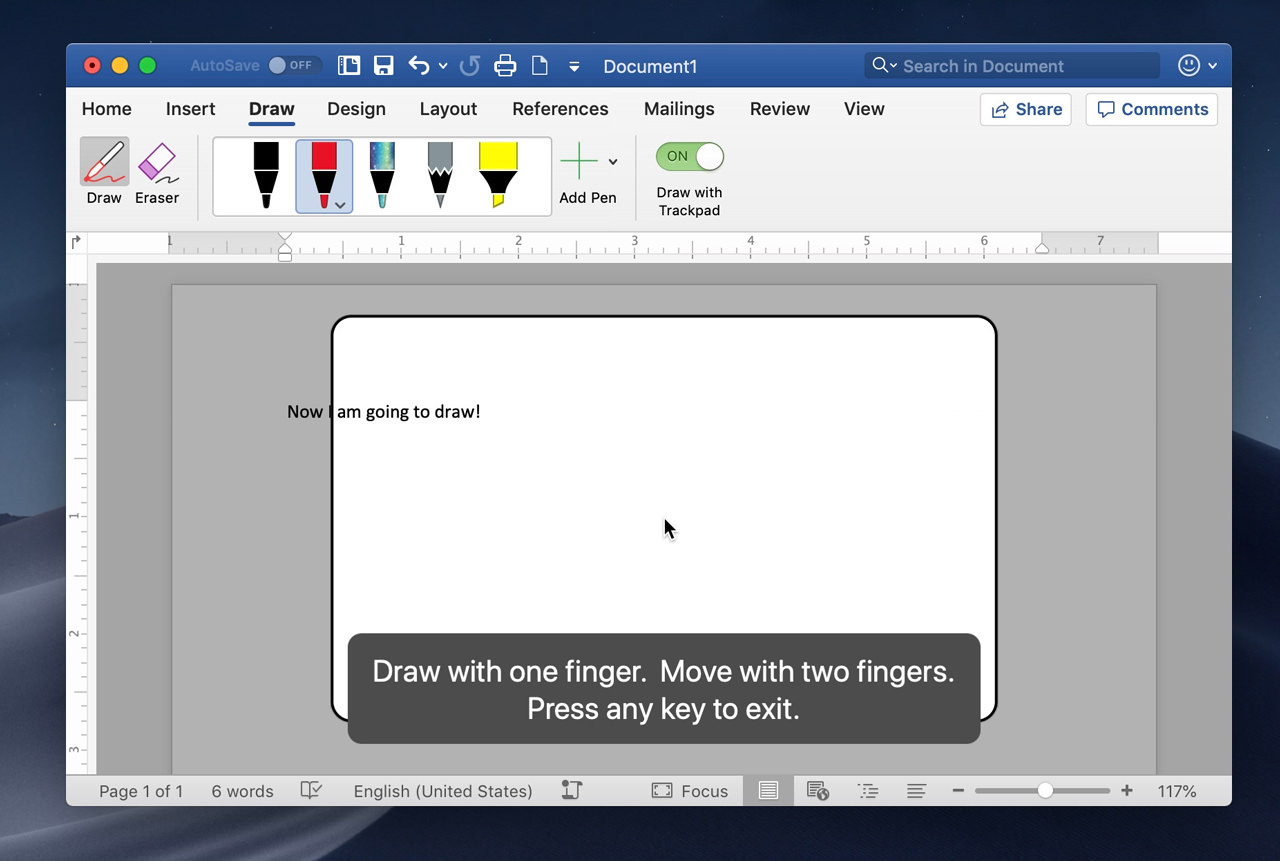
How to Draw in Word for Mac Tech Junkie
The device features a compact keyboard with a row of slim media keys. If you're a basic user and only need a trackpad to move your cursor and click on things, a basic trackpad will likely suffice. [1] its largest component is a tactile sensor: Upon installing the trackpad++ driver and control module, your computer. Rather than purchase a keyboard, trackpad, or mouse separately, the arteck combines all three into a single device.

SonarPen for USB TypeC Can Turn Your MacBook's Trackpad
Unlike windows and chromeos, macos does not provide an option to fully disable the trackpad unless an external mouse is plugged in or connected via bluetooth. It enables full trackpad functionality on macbooks running windows, enhancing the user experience. If you're a basic user and only need a trackpad to move your cursor and click on things, a basic trackpad will likely suffice.

How To Draw On Mac Trackpad
Sensors underneath the trackpad surface detect subtle differences in the amount of pressure you apply, bringing more functionality to your fingertips and enabling a deeper connection to your content. A touchpad or trackpad is a type of pointing device. As detailed above, your macbook can be set to automatically disable the trackpad when an external mouse is connected. [1] its largest component is a tactile sensor: It enables full trackpad functionality on macbooks running windows, enhancing the user experience.
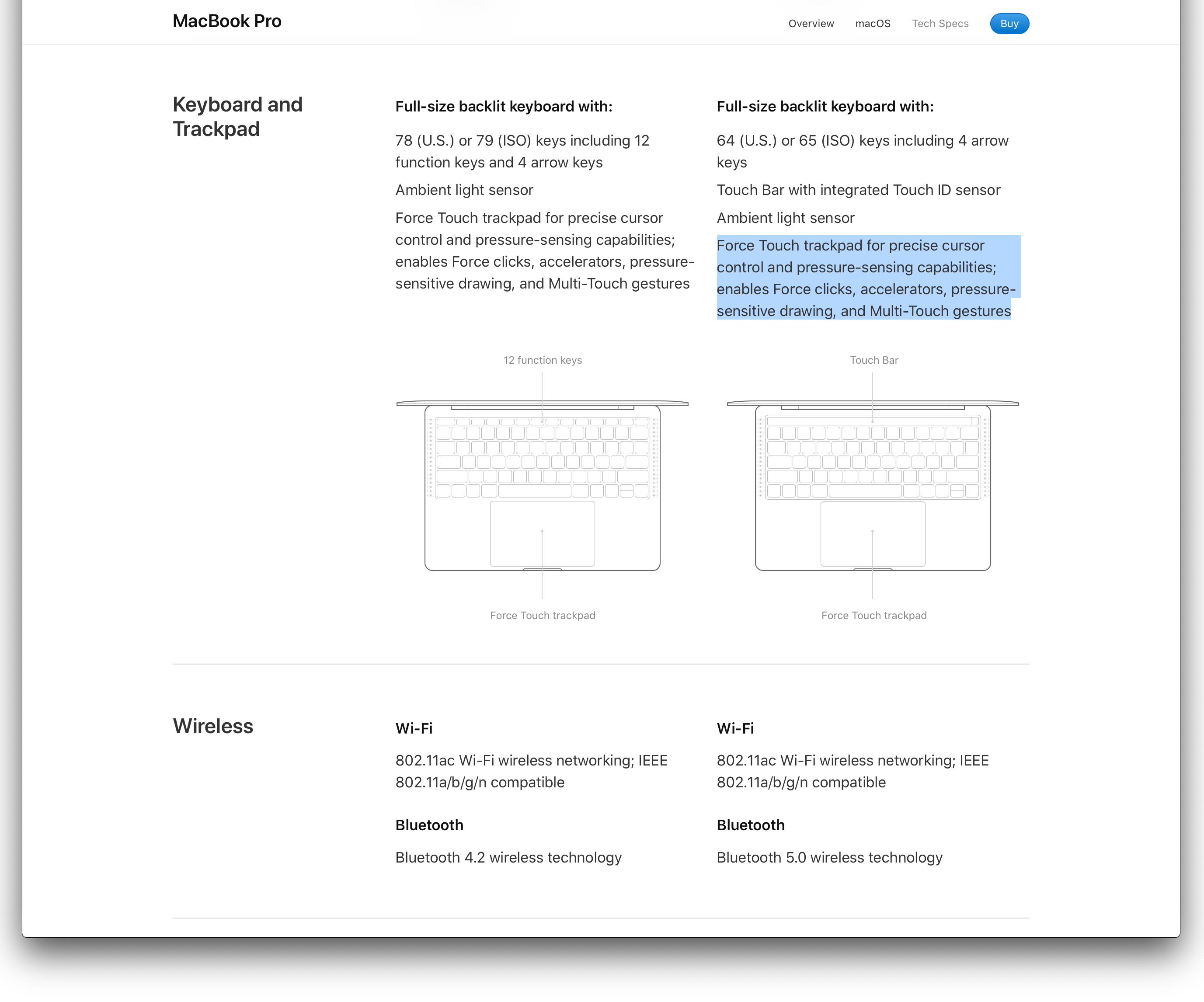
How To Draw On Mac Trackpad
Upon installing the trackpad++ driver and control module, your computer. However, if you're a power user who needs a trackpad that can keep. [1] its largest component is a tactile sensor: Sensors underneath the trackpad surface detect subtle differences in the amount of pressure you apply, bringing more functionality to your fingertips and enabling a deeper connection to your content.

SonarPen for USB TypeC Can Turn Your MacBook's Trackpad
As detailed above, your macbook can be set to automatically disable the trackpad when an external mouse is connected. If you're a basic user and only need a trackpad to move your cursor and click on things, a basic trackpad will likely suffice. However, if you're a power user who needs a trackpad that can keep. [1] its largest component is a tactile sensor: Sensors underneath the trackpad surface detect subtle differences in the amount of pressure you apply, bringing more functionality to your fingertips and enabling a deeper connection to your content.
Trackpad Drawing Mac - A touchpad or trackpad is a type of pointing device. If you're a basic user and only need a trackpad to move your cursor and click on things, a basic trackpad will likely suffice. Sensors underneath the trackpad surface detect subtle differences in the amount of pressure you apply, bringing more functionality to your fingertips and enabling a deeper connection to your content. Rather than purchase a keyboard, trackpad, or mouse separately, the arteck combines all three into a single device. Upon installing the trackpad++ driver and control module, your computer. It enables full trackpad functionality on macbooks running windows, enhancing the user experience.
If you're a basic user and only need a trackpad to move your cursor and click on things, a basic trackpad will likely suffice. [1] its largest component is a tactile sensor: As detailed above, your macbook can be set to automatically disable the trackpad when an external mouse is connected. Windows has a similar setting to disable the laptop touchpad when. Sensors underneath the trackpad surface detect subtle differences in the amount of pressure you apply, bringing more functionality to your fingertips and enabling a deeper connection to your content.
Windows Has A Similar Setting To Disable The Laptop
Rather than purchase a keyboard, trackpad, or mouse separately, the arteck combines all three into a single device. An electronic device with a flat surface that detects the position and motion of a user's fingers, and. If you're a basic user and only need a trackpad to move your cursor and click on things, a basic trackpad will likely suffice. The device features a compact keyboard with a row of slim media keys.
As Detailed Above, Your Macbook Can Be Set
However, if you're a power user who needs a trackpad that can keep. Upon installing the trackpad++ driver and control module, your computer. Unlike windows and chromeos, macos does not provide an option to fully disable the trackpad unless an external mouse is plugged in or connected via bluetooth. It enables full trackpad functionality on macbooks running windows, enhancing the user experience.
A Touchpad Or Trackpad Is A Type Of Pointing
[1] its largest component is a tactile sensor: Sensors underneath the trackpad surface detect subtle differences in the amount of pressure you apply, bringing more functionality to your fingertips and enabling a deeper connection to your content.