
How To Draw On Word Document
How To Draw On Word Document - This guide will walk you through the process, helping you add flair and personality. With a few simple steps, you can learn how to draw on word and add unique designs to your documents. Whether you’re doodling, taking visual notes, or sketchnotes, here’s how to draw in microsoft word so you can add some personality to your project. However, some new users will have a hard time finding the drawing options in microsoft word. This article explains how to use these tools. Draw, write, or highlight text in office apps with digital ink using your finger, digital pen, or mouse.
There are several types of drawings. The draw tab tools allow users to be creative in microsoft word, excel, powerpoint files. This tutorial walks you through adding freehand drawings, shapes, and annotations to enhance your documents. With a few simple steps, you can learn how to draw on word and add unique designs to your documents. However, some new users will have a hard time finding the drawing options in microsoft word.

How to Draw in Microsoft Word in 2020
This guide will walk you through the process, helping you add flair and personality. However, some new users will have a hard time finding the drawing options in microsoft word. This article explains how to use these tools. Whether you’d like to call attention to a certain part of your document, or you’d just like to add some flair, this guide will teach you the ins and outs of drawing in microsoft word.

Whether you want to draw lines, create shapes, sketch freely, or make professional diagrams, this. Learn how to draw on word document step by step in this easy microsoft word tutorial. This tutorial walks you through adding freehand drawings, shapes, and annotations to enhance your documents. Whether you’d like to call attention to a certain part of your document, or you’d just like to add some flair, this guide will teach you the ins and outs of drawing in microsoft word.

How to Draw
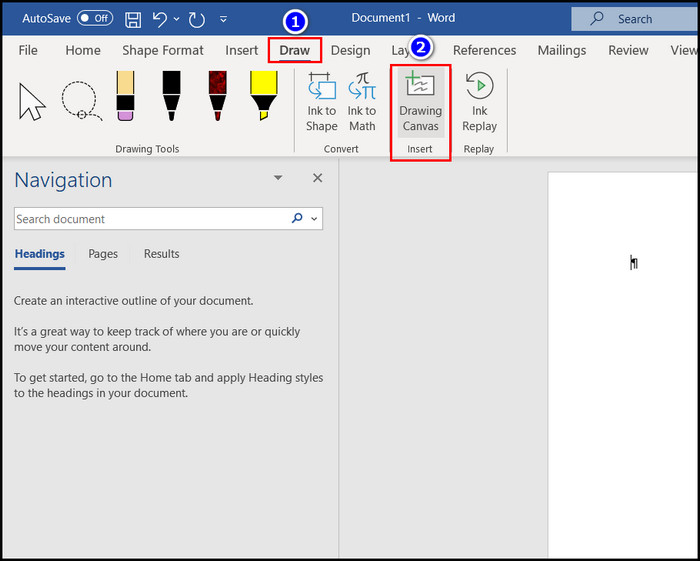
With a few simple steps, you can learn how to draw on word and add unique designs to your documents. In this article, we will provide you methods through which it is easy to draw in microsoft word. However, you may still use a drawing canvas as an organizational aid when working with several drawing objects,. Learn how to draw on word document step by step in this easy microsoft word tutorial.

Draw, write, or highlight text in office apps with digital ink using your finger, digital pen, or mouse. The draw tab tools allow users to be creative in microsoft word, excel, powerpoint files. In this article, we will provide you methods through which it is easy to draw in microsoft word. Whether you’d like to call attention to a certain part of your document, or you’d just like to add some flair, this guide will teach you the ins and outs of drawing in microsoft word.
How to Draw
This article explains how to use these tools. Draw, write, or highlight text in office apps with digital ink using your finger, digital pen, or mouse. Whether you want to draw lines, create shapes, sketch freely, or make professional diagrams, this. It is no longer necessary to insert a drawing canvas to work with drawing objects in word. Learn how to draw on word document step by step in this easy microsoft word tutorial.
How To Draw On Word Document - Whether you want to draw lines, create shapes, sketch freely, or make professional diagrams, this. Draw, write, or highlight text in office apps with digital ink using your finger, digital pen, or mouse. This guide will walk you through the process, helping you add flair and personality. There are several types of drawings. Whether you’re doodling, taking visual notes, or sketchnotes, here’s how to draw in microsoft word so you can add some personality to your project. The draw tab tools allow users to be creative in microsoft word, excel, powerpoint files.
This article explains how to use these tools. Whether you’d like to call attention to a certain part of your document, or you’d just like to add some flair, this guide will teach you the ins and outs of drawing in microsoft word. Whether you’re doodling, taking visual notes, or sketchnotes, here’s how to draw in microsoft word so you can add some personality to your project. Learn how to draw on word document step by step in this easy microsoft word tutorial. This tutorial walks you through adding freehand drawings, shapes, and annotations to enhance your documents.
This Guide Will Walk You Through The Process, Helping
However, you may still use a drawing canvas as an organizational aid when working with several drawing objects,. Learn how to draw on word document step by step in this easy microsoft word tutorial. It is no longer necessary to insert a drawing canvas to work with drawing objects in word. Whether you’d like to call attention to a certain part of your document, or you’d just like to add some flair, this guide will teach you the ins and outs of drawing in microsoft word.
The Draw Tab Tools Allow Users To Be Creative
Draw, write, or highlight text in office apps with digital ink using your finger, digital pen, or mouse. Whether you want to draw lines, create shapes, sketch freely, or make professional diagrams, this. Whether you’re doodling, taking visual notes, or sketchnotes, here’s how to draw in microsoft word so you can add some personality to your project. With a few simple steps, you can learn how to draw on word and add unique designs to your documents.
This Tutorial Walks You Through Adding Freehand Drawings, Shapes,
However, some new users will have a hard time finding the drawing options in microsoft word. This article explains how to use these tools. In this article, we will provide you methods through which it is easy to draw in microsoft word. There are several types of drawings.